


About This App
-
Category
Art & Design
-
Installs
5M+
-
Content Rating
Rated for 3+
-
Developer Email
colorjoy.feedback@outlook.com
Screenshots
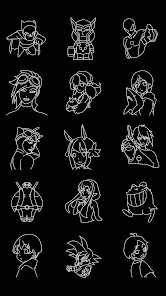
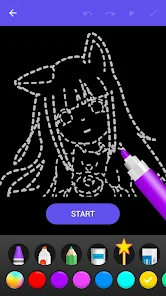
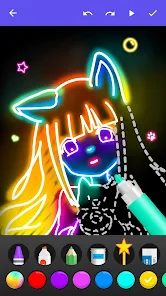
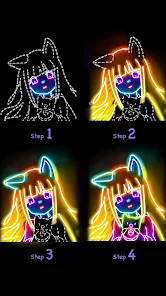
Editor Reviews
As a longtime comic enthusiast and digital artist, I'm always on the lookout for apps that can simplify the creative process without sacrificing quality. ?✨ That's exactly what drew me to Draw Glow Comics. This app isn't just another drawing tool; it's a specialized gateway into the vibrant world of glow-in-the-dark and neon-style comic art. ?️? Its core function is to provide a suite of tools specifically designed for creating illustrations that pop with luminous effects, dynamic line art, and comic-style panels, all with an intuitive interface that feels welcoming to both beginners and seasoned artists. ??In a sea of generic drawing applications, Draw Glow Comics stands out by focusing on a niche yet incredibly popular aesthetic. ?? While other apps try to be everything for everyone, this one zeroes in on glow effects, neon colors, and comic panel layouts. I chose it over similar software because it removes the complexity. You don't need to be a Photoshop expert to understand layer blending modes for glow effects; Draw Glow Comics has those powerful features built-in and accessible with a few taps. ?? The pre-set glow brushes, neon color palettes, and comic lettering tools are game-changers. They feel purpose-built, not like an afterthought added to a general-purpose app.My personal experience with the app has been a blast. ?? I started by sketching a simple character using the smooth pencil tool, then switched to the 'Electric Glow' brush for the outline. The immediate visual feedback—seeing my lines emit a soft, customizable glow—was incredibly satisfying. ?? Creating a multi-panel comic strip was surprisingly straightforward. The app offers templates and guides for panels, and dropping my artwork into them felt seamless. The text tool, with its comic-style fonts and bubble options, made adding dialogue fun and easy. I spent less time fiddling with settings and more time actually creating, which is the ultimate test for any creative software. ⚡?The community aspect, though not the primary focus, is a nice touch. Being able to see other artists' glow creations provides endless inspiration and shows the app's potential. ???? For anyone who loves comics, manga, or just wants to create eye-catching digital art with a cool, luminous twist, Draw Glow Comics is a must-try. It transforms a complex artistic technique into an accessible and enjoyable experience. ?? So, if you're ready to make your ideas shine literally and figuratively, head to your app store and download Draw Glow Comics today! Let your creativity glow! ??
Features
- ? Specialized Glow & Neon Tools: The app's heart lies in its dedicated brushes and effects designed to create luminous artwork. From soft halos to intense neon outlines, the tools provide instant, beautiful glow effects without manual layer work.
- ?️ Comic Panel Creator: It includes a robust system for building professional-looking comic strips and manga pages. Users can choose from various panel layouts, resize frames easily, and arrange their art to tell a visual story.
- ? Curated Neon Color Palettes: Instead of a standard color wheel, you get access to vibrant, pre-made palettes full of electric blues, hot pinks, and radiant greens that are perfect for the glow aesthetic.
- ? Comic Lettering & Text Bubbles: Adding dialogue is a breeze with stylized comic fonts and a variety of speech bubble, thought bubble, and caption box shapes that you can customize and place anywhere on your canvas.
- ? Layer-Based Editing: For more advanced control, the app supports layers with blending modes. This allows for complex compositions, letting you stack glow effects, shadows, and backgrounds independently.
- ✨ One-Tap Effect Filters: Apply dramatic transformations with filters like 'Neon Pulse,' 'Dark Glow,' or 'Retro Scanline' to give your finished artwork a polished, thematic finish instantly.
- ? Interactive Tutorials: Built-in guided lessons walk you through the process of creating a glow comic from start to finish, making the app's powerful features approachable for newcomers.
- ? Artist Community Gallery: An in-app gallery lets you publish your creations and browse artwork from other users worldwide, serving as a fantastic source of inspiration and community connection.
- ? Flexible Export Options: You can save your projects in high-resolution formats suitable for printing or sharing online on social media platforms, preserving all the vibrant glow details.
- ? Intuitive User Interface: The layout is clean and user-friendly, with tools logically grouped. This design minimizes clutter and helps you stay focused on drawing and creating.
Pros
- ? Instant Artistic Results: The specialized tools mean you can achieve professional-looking glow effects immediately. There's no steep learning curve; you can create stunning art from your very first session.
- ? Incredibly Fun to Use: The tactile pleasure of drawing a line that lights up is uniquely satisfying. The app makes the creative process feel more like play than work, which boosts motivation.
- ? Perfect for On-the-Go Creation: It's a fully-featured studio in your pocket. Whether you have five minutes or five hours, you can sketch, ink, and add glow effects anywhere, anytime.
- ?? Excellent for Beginners: The focused toolset and tutorials prevent overwhelm. If you're new to digital art or comics, this app provides a clear, rewarding path to creating complete pieces.
- ? Great Source of Inspiration: The community gallery is filled with amazing art. Seeing what others create with the same tools can spark new ideas and push your own creativity further.
- ?️ Smart, Focused Design: By not trying to do everything, the app does a few things exceptionally well. The tools feel deep and well-considered for their specific purpose of making glow comics.
- ? Unique Aesthetic Output: The artwork you produce has a distinctive, trendy look that stands out on social media feeds or in a personal portfolio, thanks to the vibrant neon and glow styles.
- ⚡ Smooth Performance: Even with multiple layers and complex glow effects, the app runs smoothly on most devices, ensuring a frustration-free drawing experience without lag.
- ? No Hidden Costs for Core Features: The essential drawing, glowing, and comic creation tools are available upfront, allowing for substantial creativity without requiring an immediate purchase.
- ? Regular Content Updates: The developers frequently add new brush sets, color palettes, and templates, keeping the app fresh and giving users new elements to experiment with.
Cons
- ? Can Drain Battery: The intensive rendering required for real-time glow effects and vibrant colors can consume device battery power more quickly than simpler drawing apps.
- ? Limited on Very Small Screens: While functional on phones, the detailed work of comic panels and layer management can feel cramped on devices with smaller displays. A tablet is ideal.
- ? Color Customization Limits: While the neon palettes are great, artists used to a full, advanced color picker might find the color selection and mixing options somewhat restricted for non-neon work.
- ? Large File Sizes: Projects with many high-resolution layers and effects can result in large project files, which may take up significant storage space on your device over time.
- ? Requires Internet for Social Features: Accessing the community gallery, sharing online, or downloading new asset packs requires an active internet connection, limiting some functionality offline.
- ?️ Brush Engine Simplicity: For veteran digital artists seeking highly customizable brush dynamics (like texture, scattering, or dual brushes), the brush options, while good for glow, might feel basic.
- ? Tutorial Depth: The initial tutorials are helpful, but some users might crave more advanced guides on complex comic storytelling or combining multiple advanced effects.
- ? Lacks Audio Feedback: The app is a silent experience. Some users enjoy subtle sound effects for actions like brushing or selecting tools, which could enhance the immersive feel.
- ? Limited Vector Support: The artwork is primarily raster-based. Those who prefer scalable vector graphics for clean lines at any size won't find that functionality here.
- ? Occasional Sync Delays: When using the cloud save feature across devices, there can sometimes be a slight delay in syncing the latest version of a project.
-
01How do I install this app after downloading it?
If you're an Android user and don't download the app from the official Google Play Store,you may find the installation process more complicated than usual.
But we are delighted to inform you that you don't need to worry. To ensure you could install this app smoothly,we have written and uploaded a detailed tutorial. It would guide you on installing an app after downloading it from our website step by step,with the help of pictures.
You may find this helpful article on the downloading site,or visit How to install APK/XAPK files on Android.
If you need further help,please do not hesitate to contact us via email info@appfunia.com.
-
02Is this app safe to use?
We fully understand your concern about safety. We agree that one person wouldn't be too careful in the cyber world. Meanwhile,we are happy to tell you that one of our priorities is to provide our users with safe app files that they can use without any worries.
We guarantee that all the app files we provided originate from official and reliable sources. We promise that they do not contain any malware that will harm your hardware or the safety of your privacy.
-
03Is this app free to download?
We are happy to inform you that the answer is an absolute YES! All the apps on our website are 100% free to download. Besides,you do not have to create an account. Just click on the download button,and it's done.
-
04How do I find my account back?
Recently we received a lot of emails from our users,which said they couldn't log in for different reasons,such as 'forgot the user name or password' or 'had a new phone.' We are willing to help you out. Please read the notes below to see what we can do.
To answer this question,please first let us know which account you're referring to.
If you're referring to your account of some app,like your Facebook account or your Youtube account. Unfortunately,we would not be able to help in this case. We would suggest you turn to the customer service of this application.
-
05How do I cancel subscriptions?
This question is essentially quite similar to the prior one. It's a pity that we are unable to help you to cancel the subscription to a third-party application directly,while we would suggest you to contact its customer service for further information.
-
06How do I get a refund?
Sorry that we are unable to help you to get a refund from a third-party application directly. If you wish to get a refund from a third-party app,we would suggest you to contact its customer service. We would be happy to provide you the way to contact them.
If you want a refund from us,we should apologize for your confusion. Our service is 100% free,and any payment information is not required.
If you run into any site that asks you to provide your payment information,be careful. Remember never reveal your payment information to any unauthorized third parties,no matter how attempting their offer may seem.
-
07How to use this app?
Sorry that we cannot answer this question directly,for this only aims to answer some general questions. You may find how to use a certain app by checking our review page.
Recommended Apps
Hot Apps


Disclaimer
1.Appfunia does not represent any developer, nor is it the developer of any App or game.
2.Appfunia provide custom reviews of Apps written by our own reviewers, and detailed information of these Apps, such as developer contacts, ratings and screenshots.
3.All trademarks, registered trademarks, product names and company names or logos appearing on the site are the property of their respective owners.
4.Appfunia abides by the federal Digital Millennium Copyright Act (DMCA) by responding to notices of alleged infringement that complies with the DMCA and other applicable laws.
5.If you are the owner or copyright representative and want to delete your information, please contact us info@appfunia.com.
6 . All the information on this website is strictly observed all the terms and conditions of Google Ads Advertising policiesand Google Unwanted Software policy.